
OpenMP tasks
Before starting, download this tarball.
Hello tasks!
The program no-hello.c creates as many threads as there are cores on the machine using the #pragma omp parallel directive.
According to the standard, and by construction, each thread executes its code within an implicit task that is automatically linked to it. Here, each thread/implicit task performs two printf(). For 3 threads, this produces the following task graph.

First explicit taskified hello
An explicit task is a block of instructions to be executed in parallel with others. The following program illustrates how to basically create explicit tasks thanks to the pragma omp task:

Here, each thread executes its implicit task, which explicitly creates 2 child tasks. Each explicit task displays the thread id executing it. Compile the program and run it several times to see its possible schedulings.
Then, to better visualize the work of each thread, add a variable me containing the thread id initiating the task. me is then passed to the child tasks using the firstprivate(me) clause. This clause indicates that a copy of the variable including its value is created in the child task context, like an input parameter for a function.

Run and analyze the behavior of the above program. Use more threads than cores to reinforce the non-deterministic nature of this program: each thread creates two tasks, each of which is executed by any thread in the team, in any order. Only an implicit task is associated with a thread while explicit tasks are associated with the thread team.
The OpenMP standard specifies that an explicit task can be executed immediately after its creation, or be deferred until execution by any thread in the creator thread's team. The standard also specifies that a thread can leave a task in progress to start another one; nevertheless, by default, any task started by a thread must be finished by that thread. Only tasks created using the untied clause can be taken over by any team member thread.
A lot of hello
Task generation is usually ensured by only one thread. The number of tasks launched is then independent of the number of threads, which is very convenient. To do this, a single directive (a single thread executes the block) or a master directive (only the master executes the code) is used inside the parallel directive that will compute the tasks set.
Modify the following code so that each display is handled by a dedicated task:

At this stage, the same only one thread generates tasks. If it decides to postpone this role to execute one compute task and the task queue becomes empty meanwhile, the others team threads can have to wait its return. Go further by introducing an intermediary explicit task in charge of generating all the tasks but that can be executed by any team thread.
Task synchronization
So far we've produced sets of tasks whose execution is disordered, as tasks can be executed by any thread of the team. Here, we'll look at how to introduce a dose of determinism.
Directive taskwait
We now want to wait for all « Hello » tasks to finish before creating the « Bye » tasks. To achieve this, insert a #pragma omp taskwait between the two for loops. This directive stops the execution of the current task until all its child tasks have been completed. Test this solution.
taskwait vs taskgroup
The program task-wait.c allows to observe that the taskwait directive is a barrier that waits completion of sub-tasks only in the task that generated them. By running the task-wait.c program, you can observe that tasks that have not generated tasks end quickly, as they do not have any child tasks to wait.
By refining the taskwait directive behavior, it waits not all its sub-tasks but only its child tasks. To be convinced, let consider the task-group.c, identical to task-wait.c except that "grandchild" tasks are produced in the function create_task of task-group.c. When running task-group, you observe that the task creating the subtasks doesn't wait for the grandchild tasks termination to finish, and passes the taskwait directive.
Modify the task-group.c program by deleting the call to taskwait and using the directive taskgroup. Note that the taskgroup directive applies to a block of instructions (similar to the critical, master, etc. directives). Run the task-group program again and observe that the creation task is waiting for all its descendants.
Task and lifetime of local variable
The taskwait directive can also be used to control the lifetime of local variables, as illustrated by the following program:
- Execute the program and check if it behaves correctly.
- Comment the directive taskwait and observe the execution behavior.
- Replace the shared(message) clause by a firstprivate(message) directive and observe the program behavior.
Interdependent task graph
Let go back to our hello program so that every hello is displayed before its corresponding bye more finely that just by displaying all the hellos and then all the byes.
Nested tasks
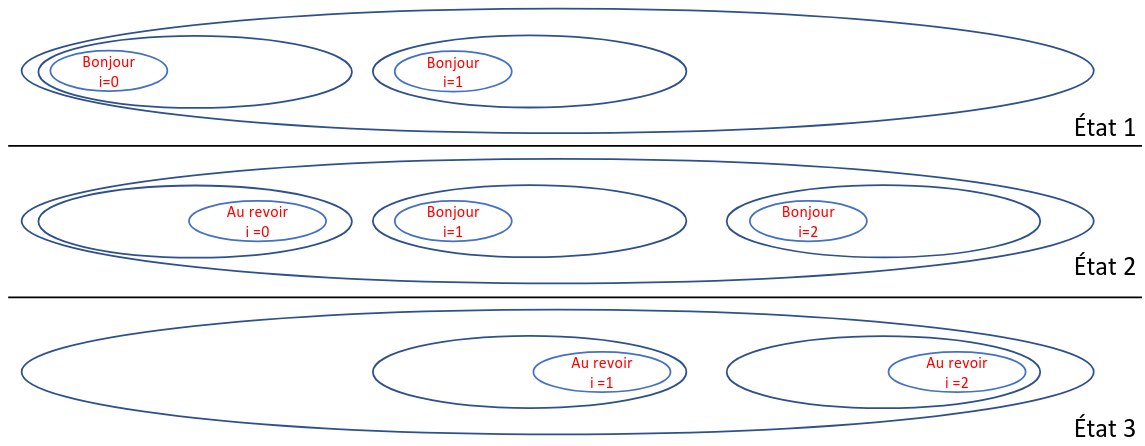
Here's a solution that uses an intermediate task to group together pairs of tasks:
Below is an example of three successive states of tasks awaiting execution. We observe that for a given i the bye task always appears after the corresponding hello task has been complete.
Data dependency
A more elegant solution is to use OpenMP's ability to automatically compute dependencies between tasks based on indications provided by the programmer. For each task, it has to be specified which data are accessed in read-only, write-only and read/write mode. Since tasks are inserted sequentially, the OpenMP runtime is able to automatically add dependencies between a task that produces an object and those that consumes it.
Add dependencies in single-hello.c that produces the following task graph. To do this, you have to be clever by adding a clause depend(out: hello[i]) to the pragmas of the hello tasks and depend(in: hello[i]) to the pragmas of the bye tasks. It indicates to the OpenMP runtime that each hello task produces the data hello[i] and that this data is required to execute the corresponding bye task.

Research of components in an image
This exercise focuses on searching for components in an image in OpenMP. To do this, we will use the max kernel provided in sequential in EasyPAP.
Introduction
Two non-zero pixels belong to the same object if they are directly connected or if there is a path of connected non-zero pixels linking them. Two pixels are considered connected if they share an edge (i.e., they are neighbors to the north, south, east, or west).
To identify the objects, it starts by assigning a unique color to each non-zero pixel. Then, it iteratively propagates the maximum value to neighboring pixels. After several iterations (at most equal to the total number of pixels), all pixels belonging to the same object will have the same value — specifically, the highest one among them. At this point, propagation reaches a stable state, and the process is complete.
The propagation can be basically done by iterating over all pixels. Nevertheless, its performance can be significantly improved by using two directional passes instead of a full sweep each time.
It then becomes unnecessary to compute the maximum over all four neighboring pixels. Instead, it's enough to consider only those neighbors that most effectively propagate the maximum label.
By convention, let's define the downward pass as scanning the image from left to right, from top to bottom. In this pass, to propagate the maximum label downward, we only need to compare the current pixel's label with those of its west and north neighbors. The upward pass is defined as scanning from right to left, from bottom to top. In this case, to propagate the maximum label upward, we compare the current pixel's label with its south and east neighbors.
This algorithm is implemented in the max_compute_seq function of max.c. You can launch it like this (note that specify the variant is unnecessary):
Parallelization with an OpenMP for directive
In a variant you call ompfor, parallelize the initial code using a OpenMP for construct, without necessarily preserving the data dependencies implied by the sequential version: the order of computations does not matter as long as the algorithm reaches convergence (stagnation).
Here, the goal is to parallelize the functions tile_down_right and tile_up_left (by copying them, in order to keep the original sequential versions), in the simplest way possible — by adding just two directives.
- Verify that the result is correct on the image spirale.png:
./run -l images/spirale.png -k max -v ompfor
- Measure the performance on a generated spiral of dimension DIM = 2048 with 100 tours (options -s and -a) (option -n, for --no-display takes the measure and prints the result in milliseconds):
./run -s 2048 -a 100 -k max -v ompfor -n
Note: Experimental results show that merely parallelizing the for loops can lead to a significantly higher number of iterations compared to the sequential version, especially in the presence of large connected components. Indeed, assuming that all pixels in the image are opaque, the parallel implementation may require as many iterations as there are threads to fully propagate the maximum value across the object, whereas the sequential implementation necessitates only one.
Parallelization with OpenMP tasks
One possible approach to improve the previous parallel implementation is to sacrifice some degree of parallelism in order to preserve a better propagation of the maximum label. In Figure 1 below, each cell represents a tile of pixels. The contents of each tile are processed sequentially.
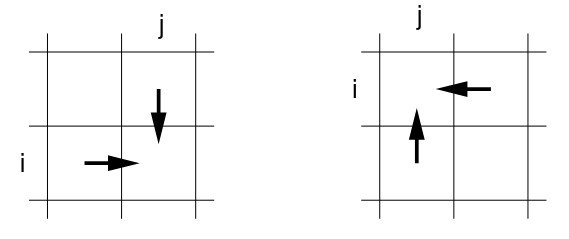
Figure 1 - Dependencies between tiles during the downward pass (on the left) and the upward pass (on the right).
In the downward phase, processing begins with the tile in the top-left corner. More generally, a tile can be processed once its north and west neighbors have been processed.
Symmetrically, in the upward phase, processing starts with the bottom-right tile. In general, a tile can be processed once its south and east neighbors have been processed.
The tiled version of this algorithm is implemented in the function max_compute_tiled (in max.c), where the number of tiles is defined by NB_TILES_X × NB_TILES_Y. To ease the observation, square tiles can be used by specifying the same number of tiles in both directions via the --nb-tiles (or -nt) option. For example, to use a 16×16 tiling:
Parallelize the code of the tiled version (by creating a new variant max_compute_task) so that each tile is executed by an OpenMP task. Use the depend clause to enforce the execution order of the tasks, so as to preserve the sequential propagation of the maximum value. To ease the expression of dependencies (likewise in exercise 2.2.2), you can use an auxiliary array that serves only for expressing dependencies (it does not participate in the computation itself):
Check the result visually and the number of iterations used on spirale.png (with and without -n option):
Verify, using an execution trace, that the dependencies between tasks are correctly enforced. For doing that, use the following sequence of commands:
By moving the mouse over the Gantt chart from left to right, you should observe a "wavefront" of tasks progressing toward the bottom-right corner (see Figure 2), then toward the top-left corner, and so on.
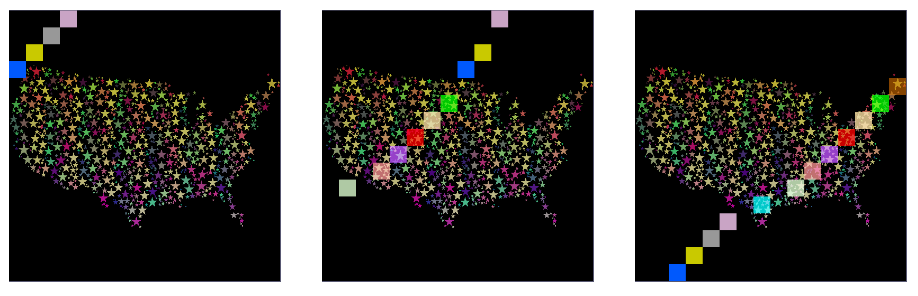
Figure 2 - Progression of the task front during the downward phase of maximum propagation.
Towards the optimal setting
Compute a theoretical upper bound of parallelism based on the number of tiles along one dimension (e.g., NB_TILES_X), assuming an unlimited number of processors is available.
Determine experimentally the optimal number of threads to use in order to achieve satisfactory speedup, using a script inspired by plots/run-xp-mandel.py.
Adapt also the script plots/run-xp-heat-mandel.py in order to vary the tile size by using the following options:
You can also remove the unnecessary configuration of OMP_SCHEDULE variable.
Use the following commands in order to generate a heatmap and observe the program behavior in term of speedup according to the tile geometry (ajust option allows to adjust the image scaling):
Travelling salesman problem
We're looking to optimize a salesman's tour, passing through a set of cities and returning to his starting point. Here we consider an Euclidean space in which the cities are all connected in pairs.
Few tips on the code
The number of cities is contained in nbCities and the variable minimum contains the length of the smallest known tour.
When calling void tsp(stage, lg, chemin, mask), the parameter path contains a path of stage integers (cities) all distinct; the length of this path is lg; the i-th bit of the variable mask is equal to 1 if and only if city i appears in the path.
The variable grain contains the requested level of nested parallelism (0 - no parallelism; 1 - a single thread team is created on the first level of the search tree; 2 - thread teams are additionally created at level 2 of the tree, etc).
Sequential version
Take a quick look at the implementation provided and try it with 12 cities and a 1234 seed. The expected minimum path is 278.
Measure the time required for 13 cities and a seed 1234. Note that the tree path is exhaustive, so the analysis generated by two sub-pathes of k cities require the same number of operations (their complexity ultimately depending only on k and the number of cities).
Parallelization with threads
We parallelize here the program without seeking to optimize its performance.
Copy the code of the function tsp_seq function in the function tsp_ompfor. Then add the following pragma just before the loop that launches the recursive exploration of sub-trees.
Run the parallel version:
Take care now to shared or private variables. In particular, it is important to prevent threads to concurrently work on the same shared array. It also means protect concurrent access to the minimum variable.
Once your program works, compare the performance of the parallel program with its sequential version. The acceleration should not be huge as there is a lot of path copies and the call to #pragma parallel induces a non-negligible overhead even if a clause if clause deactivates the parallel section.
Observe the performance when varying the grain parameter. Do not forget to position the OMP_NESTED environment variable.
Obvious optimization
Let's start by removing the unnecessary OpenMP overhead by switching to the sequential function when no more parallelism is generated:
Then, observe the usage of variable minimum and remove the critical section that protects its access when only read. Only a modification of the variable has to be done in a critical section.
Parallelization with directive collapse
Another way to parallelize the code is to distribute to threads all the paths of n steps from city 0. This distributes n-tuples of cities by using the directive collapse(n).
Insert the functions of the file collapse.c and call them from the main().
Compare the execution time of the different versions.
Algorithmic optimization - branch cutting
There is no point in continuing to evaluate a path when its length is greater than the current minimum (corresponding to the length of the smallest complete path already found). To implement this optimization, insert the following test at the start of recursive tsp_xxx() functions.
Compare performance of the different version with 15 cities and a seed of 1234.
This optimization unbalances the calculation, as the path analysis is no longer exhaustive: some branches are cut very high, others very low. This optimized parallel code has become irregular.
Parallelization with tasks
Now let's parallelize using OpenMP tasks.
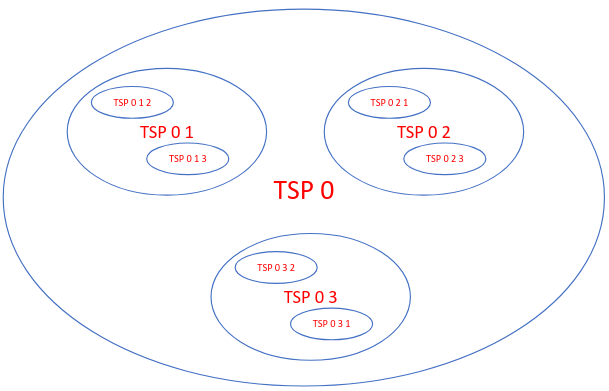
Here's the nested task graph for 4 cities:
For this purpose:
- duplicate the function tsp_ompfor and name it tsp_task. (don't forget to change the recursive call);
- create threads in the tsp_task function, but with a single thread launches the search;
- insert a directive to create a task for each recursive call to the tsp_task procedure;
- insert a taskwait clause at the end of the function in order to avoid the loss of the array path.
Another solution is to dynamically allocate a data zone to duplicate the path and then pass the address of this to the task. As each task owns its own path, no synchronization is required. However, the task will have to free the dynamically allocated memory.
Compare the performance of both implementations.